Floral Bouquets 1: A Practical Watercolor Asset for Designers, Creators, and Small Business Owners
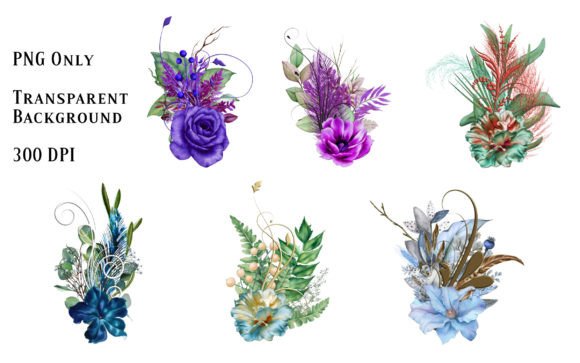
Floral Bouquets 1 is a curated set of six watercolor bouquet illustrations designed for direct use in visual projects. Each element arrives as a high-resolution PNG file on a transparent background, meaning you can place these florals into layouts without clipping, masking, or removing backgrounds. The files render at 300 DPI, which covers both digital screens and professional print output. Since this is a digital download, you receive the assets immediately after purchase and no physical product ships. The collection includes bouquets in varied color arrangements, so you have options when matching an existing palette or building a new composition from scratch.
What makes this type of resource valuable is its flexibility. You might use a single bouquet as a focal point on a greeting card one day, then repurpose two of them as corner accents in a social media template the next. Because the backgrounds are transparent, the bouquets layer cleanly over solid colors, photographs, typography, or textured paper scans. The work of isolating the floral shapes has already been done for you, which shifts your time toward arrangement, color adjustment, and finishing rather than extraction and cleanup.
What the Collection Contains and How It Arrives
When you complete the download, you receive six individual PNG files. Each file holds one watercolor bouquet with soft blending, uneven edges, and the translucent washes that characterize real watercolor paint. The transparent background means no white rectangle surrounds the content. You can drop a bouquet onto a cream-colored card background and see only the flowers and foliage, with the paper tone showing through the negative spaces. This detail matters when you are layering multiple elements or working with non-white backgrounds.
The 300 DPI resolution gives you room to scale. If you need a bouquet to fill a five-inch frame on a printable PDF, the pixel density holds up without visible softening. If you need a smaller accent for a website hero image, you can reduce the size and retain crisp edges. You control the dimensions based on the output medium, and the original file quality gives you that latitude.
The varied color range across the six bouquets is a practical feature. Rather than buying separate packs for blue florals, pink arrangements, warm-toned clusters, and mixed palettes, you receive a small spectrum in one purchase. This helps when you are prototyping several design directions and want to test which color story resonates with the content or the audience.
Where Watercolor Florals Fit Into a Design or Production Process
Floral elements like these tend to enter a project during the assembly phase, after the structural decisions have been made. You might already have a layout grid, a typeface pairing, and a rough color scheme. At that point, adding a watercolor bouquet can shift a design from competent to considered. The organic shapes contrast with geometric layouts. The painted texture adds a tactile quality that vector graphics alone sometimes miss.
In a card design workflow, for example, you might begin with a standard A5 canvas, set your margins, place a sentiment in a serif typeface, and then position a bouquet from Floral Bouquets 1 asymmetrically in one corner. Because the asset is a PNG with transparency, you can place it behind or in front of text layers depending on the composition. You can also duplicate the bouquet, mirror it, reduce opacity, and use it as a subtle background element behind the main message area. This reuse of a single file across multiple layers reduces the number of external assets you need to source.
For digital product creators, the sequence might look different. You might start with a product mockup, place a bouquet near the product image to soften the frame, and adjust the hue-saturation controls in your editing software until the floral tones complement the product packaging. Because the bouquets are raster images with watercolor texture, they bring a handcrafted feel without requiring you to scan physical paintings or hire a traditional artist for each iteration.
Compatibility Across Software, Platforms, and Output Formats
PNG files with transparency work across virtually all modern design and publishing software. You can open and place them in Adobe Photoshop, Illustrator, InDesign, Affinity Photo, Canva, Procreate, GIMP, and most presentation applications including PowerPoint and Google Slides. This broad compatibility means you are not locked into a specific tool ecosystem. If you create card designs in Canva for quick turnaround but switch to Affinity for client work that requires CMYK conversion and print-ready export, the same Floral Bouquets 1 files work in both environments.
When preparing files for print, the 300 DPI resolution aligns with standard offset and digital press requirements. You should still check your document resolution settings and ensure that any upscaling does not exceed the original pixel dimensions by an unreasonable margin. For most frame, card, and stationery applications, the default sizes hold up well. If you need to print a large poster and the bouquet becomes a background element, you may want to test a small section first to confirm that the watercolor grain still reads as intentional rather than degraded.
For web and screen use, the PNG format preserves transparency and handles rich color transitions well. If file size becomes a concern, you can run the images through a compression tool that supports transparency, but avoid over-optimizing since the subtle watercolor washes can develop banding artifacts if compressed too aggressively.
Practical Uses Across Frames, Cards, and Beyond
The most immediate application for Floral Bouquets 1 is decorating frames and cards. A simple wooden frame template layered with a watercolor bouquet on one side creates a product mockup that feels warm and approachable. Card designers can build birthday, wedding, sympathy, and seasonal greetings around these florals without painting each element from scratch. The transparent backgrounds let you place a bouquet over a photo, then layer a semi-transparent white or cream block behind the text for readability. You can also rotate, crop, and combine multiple bouquets to create borders, wreaths, or scattered petal effects.
Beyond frames and cards, these assets serve well in branding contexts. A small business owner might use a single bouquet as a consistent visual signature on thank-you notes, price tags, packaging labels, and social media quote graphics. The repetition of the floral element across touchpoints creates a subtle visual thread without requiring a full brand illustration system. A coach or consultant might place a bouquet on the cover of a downloadable PDF guide, then use a cropped version as a footer accent on internal pages. The asset works as both feature and support, depending on placement.
Educators and content creators can integrate these florals into presentation slides, worksheets, and course materials. A slide deck about spring programming or women's leadership, for instance, can carry a floral motif that feels intentional rather than generic. Because the backgrounds are transparent, you can tint the entire bouquet with a color overlay to match a school palette or event theme without altering the original file.
Organizing and Managing Your Digital Asset Library
Once you download Floral Bouquets 1, take a moment to store the files in a way that supports quick retrieval later. A simple folder structure works: create a main folder called "Watercolor Florals" and subfolders by color family or by project type. Rename the files if the default names do not describe the dominant colors or bouquet shapes. You might label them as "Bouquet_Pink_Rose_Cluster.png" or "Bouquet_Blue_Delphinium_Wildflower.png" if you can identify the floral types and tones. This small upfront effort saves you from opening six files every time you want to find the right bouquet for a new composition.
Back up the original files to an external drive or cloud storage before you begin editing. Keeping a clean, unaltered set preserves your ability to return to the source material months later without wondering which version has the correct color balance. If you create modified versions for specific projects, save those as separate copies in project folders and leave the originals untouched.
Combining Floral Bouquets With Other Design Resources
Floral Bouquets 1 does not operate in isolation. Most design projects combine multiple asset types: typography, photographs, vector icons, patterns, and textures. The watercolor bouquets work alongside these elements most effectively when you match the visual weight and texture. If you pair a soft watercolor bouquet with a crisp, flat vector icon, the contrast can be intentional but may also feel disjointed. A small amount of grain or texture applied to the vector element, or a slight desaturation of the bouquet to pull it toward the icon's color space, can bridge the gap.
When using these bouquets with photography, pay attention to lighting direction and color temperature. A bouquet with warm afternoon-light tones sits naturally next to a photo with similar warm lighting. A cool-toned bouquet with lavender and blue flowers may work better with imagery shot in shade or with cooler white balance. You do not need a perfect match, but noticing these relationships improves the coherence of the final piece.
Quality Control and Consistency Across Multiple Projects
Consistency matters when you use the same floral assets across a series. If you are building a set of twelve monthly planner pages, for example, you want the bouquets to feel like they belong to the same family. Floral Bouquets 1 helps here because all six files share a similar painting style, texture density, and edge treatment. They were created as a set, so the brushwork and level of detail remain consistent from one bouquet to the next.
As you work, keep an eye on how scaling affects the perceived texture. A bouquet scaled down to a tiny corner accent may lose the visible paper-texture grain that gives it character. In those cases, you can either accept the smoother appearance or slightly increase the size and crop more aggressively to retain texture. Similarly, if you are printing on uncoated paper, the absorption of ink can soften the watercolor effect, so run a test print on your intended stock before committing to a large batch.
Making the Purchase Decision and Planning for Immediate Use
Before buying Floral Bouquets 1, clarify how you expect to use the assets in the near term. If you have three card designs planned for the next month and have been searching for floral elements that do not require background removal, this collection fits that need directly. If you maintain a library of design resources for client work, these bouquets add a painterly style that stock photo sites often lack. The transparent PNG format and 300 DPI specification match the technical requirements most designers already work with, so there is little friction in adding them to your existing toolkit.
Consider also the time savings. Isolating watercolor flowers from a photograph or scan can take thirty minutes to an hour per image, depending on the complexity of the edges and the background. With six bouquets already isolated, you gain back multiple hours on a single project. For small business owners and freelancers who manage their own design work, that reclaimed time translates to faster turnaround, more iteration cycles, or the ability to take on additional projects in the same timeframe.
Long-Term Value and Reuse Potential
Unlike a physical product that wears out or a printed sheet that you use once, digital assets like Floral Bouquets 1 remain usable indefinitely. You can return to the same files years later for a new project, a rebrand, or a seasonal campaign. The watercolor style, while subject to design trends, has held steady in popularity across stationery, branding, and publishing for decades. This stylistic longevity means the assets are less likely to feel dated in two years than a highly trend-specific graphic element might.
To extend the life and versatility of the collection, experiment with color adjustments, blending modes, and partial cropping. A single bouquet can generate multiple derivative looks: desaturate it for a vintage feel, overlay a warm gradient for an autumnal shift, or set the blend mode to "multiply" over a textured background for a completely different tactile result. Each adjustment creates a distinct variation while still drawing from the original painted forms.
As you integrate these watercolor elements into your regular workflow, you will likely develop go-to placements and combinations that speed up your design process. That familiarity, built over repeated use, turns a collection of six files into a reliable component of your visual vocabulary—one you can reach for without hesitation when a project calls for organic texture and a hand-painted feel.