Bougainvillea Floral Frames: A Practical Design Asset for Romantic and Sophisticated Projects
When a project calls for a soft, refined aesthetic, the right decorative element can shift the entire composition. Bougainvillea Floral Frames offer a nuanced, hand-drawn watercolor look that fits seamlessly into invitations, branding, social media graphics, and printed keepsakes. Instead of spending hours trying to replicate the texture of natural pigments or scanning botanical illustrations, you receive two high-resolution PNG files ready to drop into your layout. This isn’t just a pretty embellishment; it’s a practical resource that accelerates your creative workflow while preserving a fine art finish.
Understanding how to store, select, and integrate these frames determines whether they become a one-off decoration or a reusable asset across multiple client projects. The following sections walk through the entire lifecycle—from file organization to final output—so you can make the most of the Bougainvillea Floral Frames Watercolor Floral Frame package without second-guessing resolution, compatibility, or print quality.
What the Package Actually Contains
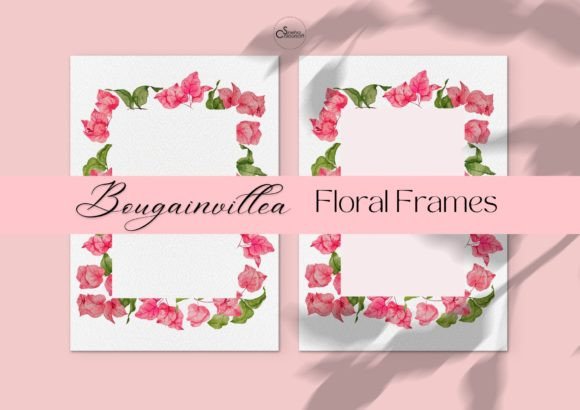
Before embedding any graphic into a design, clarity on the deliverables saves time and prevents formatting errors. This set includes two PNG files, each sized at 2100px by 2970px—a generous A4-equivalent canvas that retains sharpness at 300 DPI for most print scenarios. You receive one frame with a background and one frame without. The background version offers a ready-made painted backdrop, while the transparent version lets you place the floral arrangement directly onto any surface, whether it’s a pastel card stock, a textured paper overlay, or a digital collage.
The frames are hand-drawn and scanned at high resolution, with careful attention to preserving the edge details of stems, petals, and leaf veins. That preservation matters because it delivers an authentic fine art texture that generic vector brushes rarely match. There is no watermark on either file, so you can drop them into commercial or personal projects immediately. Recognizing these technical specs early on helps you plan more accurately: you know the aspect ratio, the color space (typical of scanned watercolor), and whether you need to isolate elements further or are ready to place them directly into your design software.
Setting Up Your File System for Efficient Access
A single download can easily get buried in a cluttered asset library. To make Bougainvillea Floral Frames a reliable part of your design toolkit, create a folder structure that mirrors how you actually search for graphics. For instance, use a parent folder named “Floral_Assets” with subfolders like “Watercolor_Frames”, then rename the files descriptively—such as “Bougainvillea_Frame_Background_2100x2970.png” and “Bougainvillea_Frame_Transparent_2100x2970.png”. Add a metadata text file noting the source, the hand-drawn nature, and the fact that both the background and no-background versions are available. This small organizational step pays off when you’re working under a deadline and can’t afford to open multiple files just to check which one has the transparent background.
If you use digital asset management tools or cloud drives, consistent naming conventions also make searches more reliable. Tagging the files with keywords like “watercolor,” “bougainvillea,” “romantic,” “frame,” and “wedding” ensures they surface when you’re building mood boards or repurposing assets for a new seasonal campaign. Treat these frames like any other reusable resource; their value compounds when you can rapidly locate and adapt them.
Integrating the Frames into Your Primary Design Software
Most designers work across a mix of applications—Adobe Photoshop, Illustrator, InDesign, Canva, or even Affinity Publisher. The PNG format makes Bougainvillea Floral Frames universally importable. Because the files are raster-based, they don’t require font activation or special brush packs. In Photoshop, place the transparent variant on a separate layer above your background texture, then use blending modes like Multiply to let underlying paper grain show through, or add a soft drop shadow for depth. In InDesign, import the frame into an image box and apply text wrap so your event details flow around the petals without harsh clipping. When working in Canva, simply upload the PNG and drag it onto your canvas—the transparent frame appears without a white box, immediately blending into any colored background you’ve set.
One practical integration tip: if you need to match the watercolor tones to a specific brand palette, apply a hue/saturation adjustment layer (in Photoshop or similar) clipped to the frame. Because the edges are soft and organic, subtle color shifts look natural rather than digitally manipulated. The background version can serve as a quick hero image for a social media post, while the transparent frame can overlay product photography, softening the composition without obscuring the main subject. Pairing these two variations within the same project creates visual consistency across digital banners and printable stationery.
Layering with Typography, Textures, and Other Visual Elements
A well-composed design orchestrates multiple elements so that none compete for attention. Bougainvillea Floral Frames work best when they support the focal point—usually a headline, couple’s names, or a call-to-action. Start by placing the transparent frame over a background that provides gentle contrast: a lightly textured paper, a solid muted color, or even a faint linen pattern. Then position your primary text slightly off-center, allowing the floral clusters to cascade around it. If the frame is dense in one corner, balance it with subtle typography or negative space on the opposite side.
Layering also involves considering scale. At 2100px by 2970px, the frames can be proportionally reduced for a 5x7 invitation without losing detail, or cropped to highlight a single branch for a smaller label or thank-you card. When you want to add a tactile handmade quality on screen, keep the background version untouched and overlay fine art paper textures beneath it in a smart object to simulate deckled edges or cotton rag surfaces. The high-resolution scan means even when zoomed in, the brush strokes and pigment granulation retain their hand-painted character, which anchors the “fine art” feel that many stock vectors can’t replicate.
Printing Strategies for a Fine Art Finish
The product description suggests using these illustrations on handmade paper to achieve an extra fine art look, and the technical specs support that recommendation. Because the files are scanned from hand-drawn originals, printing on textured substrates—cold press watercolor paper, laid paper, or cotton cardstock—enhances the illusion that the frame was painted directly onto the sheet. When preparing files for print, keep the resolution at 300 DPI at the output dimensions. For a typical invitation size, 5x7 inches, you have plenty of pixel data to downscale cleanly. For larger formats like A4 programs or signs, the full 2100x2970px file matches the paper proportion nicely without interpolation artifacts.
Selecting the right printer and color management matters as well. The watercolor palette tends toward soft pinks, muted greens, and delicate ochres. Ensure your printer profile leans toward accurate color reproduction rather than overly saturated defaults. If you’re sending the design to a professional print shop, provide both versions and specify which areas should show the paper texture through the transparent frame. The background version can be printed as-is for a full-coverage painted look on matte paper, while the transparent frame gives you the flexibility to print only the floral border on pre-textured cardstock, leaving the center clean for calligraphy or foiled elements.
Applying the Frames Across Romantic and Sophisticated Projects
While wedding stationery is the most obvious use case, the versatility of Bougainvillea Floral Frames extends much further. Event planners can use them for bridal shower menus, table numbers, and signage. Small business owners in the beauty, wellness, or artisan food industries can integrate the soft botanical aesthetic into product tags, packaging inserts, or loyalty cards. Bloggers and content creators might repurpose the frame as a consistent overlay for Pinterest pins, newsletter headers, or digital download covers, giving their brand a cohesive, elevated appearance without commissioning custom illustrations each season.
Consider a step-by-step project: a stationery designer develops an invitation suite. They import the transparent frame into their layout software, layer a scanned silk ribbon texture beneath, and position the couple’s monogram in the center. After approval, they reuse the same frame—cropped and recolored slightly—for the RSVP card, the directions insert, and the thank-you note. The consistency ties the printed materials together while each piece maintains its own functional layout. Similarly, a blogger launching a romantic-themed e-book could place the background frame as the cover base, then overlay the title in an elegant serif. The high-resolution file allows the same frame to appear sharp on both a digital screen and a print-on-demand paperback cover.
Maintaining Quality and Consistency Over Time
Once you’ve used the frames successfully in one project, the natural impulse is to treat them as a go-to resource. To prevent them from becoming stale or clashing with future designs, document how you’ve applied them: note the blending modes, color adjustments, and complementary typefaces that produced the best results. Creating a style guide entry for these assets—even a simple one-page reference—helps you replicate success without starting from scratch.
Over the long term, the fact that these are hand-drawn, high-resolution scans with preserved edge details gives them an enduring quality that vector-heavy visuals sometimes lack. As trends shift toward more organic, human-touched aesthetics, the watercolor frame remains relevant. Store the original files in a master assets folder, never editing the primary copy. Always duplicate the file before cropping, recoloring, or compressing for web use. This protects the full-resolution original, ensuring you can return to it for a large-format print or a new creative direction years from now.
Pay attention to licensing and usage rights as well. While these frames come without watermarks and are intended for your romantic and sophisticated projects, clarifying whether they allow commercial use, client work, or resale as-is will inform how you integrate them into your business workflow. Most digital asset creators provide a license file; keep that documentation alongside your file system for quick reference.
Adapting the Frames for Digital-Only Outputs
Though the frames shine on paper, digital applications benefit equally from the soft watercolor touch. Email marketing graphics, Instagram stories, website hero banners, and online course slides often feel impersonal and cold with sharp vector icons and geometric patterns. Substituting a Bougainvillea Floral Frame as a corner accent or border instantly softens the visual tone while maintaining professionalism. The transparent PNG is particularly suited for layered digital designs because it accommodates parallax effects, mouse-over animations, or semi-transparent overlays without needing to mask out a background.
When optimizing for web, export a copy scaled to the exact pixel dimensions required, using a resolution of 72 DPI. Because the original file is already a crisp hand-drawn scan, downscaling preserves the brush detail. For retina displays, you might export at double the display size and use CSS or HTML to scale it down, keeping the petals crisp on high-resolution screens. The background version can serve as a ready-made banner background, while the transparent version can frame a product photo without overwhelming it. This dual-file setup reduces the time you spend removing backgrounds or adjusting masks, directly accelerating your digital production rhythm.
Practical Observations from Real-World Use
Users often report that the most significant workflow advantage is simply knowing exactly what they’re getting. The two-file package eliminates guesswork: you don’t need to extract a background or paint a matching backdrop, because both options are already provided. This isn’t a minor detail; in the middle of a tight client revision cycle, being able to swap between background and transparent versions in one click keeps momentum moving. Additionally, the file dimensions align well with standard stationery sizes, reducing the need for awkward cropping or resizing that could clip the delicate floral edges.
Another observation concerns color matching. While watercolor inherently contains subtle variegations, the scanned edges retain the soft, bleeding pigment effect that gives a genuine fine art look. When placed next to solid vector shapes, the contrast is immediately noticeable—the frame feels organic and gently imperfect. This quality often elevates a design from competent to remarkable, particularly in markets where handcrafted authenticity is a selling point.
Making the Frames Part of a Larger Creative System
Bougainvillea Floral Frames don’t exist in isolation. They complement other design resources such as vintage paper textures, calligraphy fonts, pastel color palettes, and botanical clip art. By building a kit of coordinated assets—perhaps a folder of complementary watercolor wreaths, ribbon banners, and deckled-edge backdrop textures—you create a modular system that can be mixed and matched for various client needs. The transparent frame can align with a different floral motif from another set without clashing, provided the watercolor style and saturation levels are similar. This systematic approach reduces creative fatigue because you’re not reinventing a floral border every time; you’re refining a proven composition strategy.
When you next plan a romantic or sophisticated project, the question shifts from “Where do I find a high-quality floral frame?” to “Which variation of the bougainvillea frame fits the tone?” That subtle shift in your internal workflow represents the real value of a well-organized, dual-format digital asset. It turns a product from a one-time purchase into a dependable element you can reach for consistently, saving planning time and preserving the high aesthetic standard your audience expects.