Decoding the Watercolor Blush Pink Floral Wreath as a Design Asset
When browsing collections of downloadable graphics, the watercolor blush pink floral wreath stands out as a versatile option that straddles the line between soft, handcrafted charm and crisp digital precision. This particular resource arrives as a single high-resolution transparent PNG, typically measured at 12 x 12 inches and set to 300 DPI — specifications that matter far more than many first-time buyers realize. Understanding what that combination actually delivers, and how it compares with other wreath styles or file formats, helps you decide whether it earns a permanent slot in your design toolkit or becomes a purchase you rarely reach for.
What a Watercolor Blush Pink Floral Wreath Actually Contains
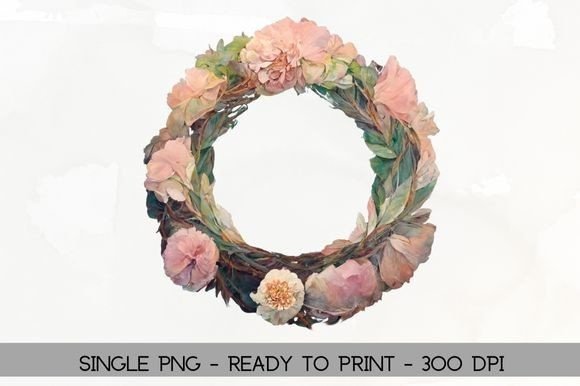
At its core, this asset is a single raster image of a circular floral arrangement rendered in soft, translucent pink tones. The watercolor technique gives it gentle washes of color, irregular edges, and subtle pigment blending that mimics actual paint on paper. Because it comes as a transparent PNG, you avoid any white or colored background box; the wreath floats freely, ready to layer over photographs, textured backgrounds, or solid colors. The promised 300 dots per inch at a 12-inch square means the file contains enough pixel data to print clearly at full size without visible jagged edges — a crucial factor when the final output is a physical invitation, a framed art print, or any tangible item.
The “blush pink” palette anchors the piece in a specific mood: romantic, spring-like, feminine, and gentle. It complements nursery decor, bridal shower stationery, and branding for wellness or beauty niches. Unlike a generic pink wreath, the blush tone carries a muted warmth that avoids the saccharine quality of bubblegum hues or the intensity of magenta. This nuance becomes important when you need the wreath to harmonize with other design elements rather than dominate them.
Comparing Formats: Transparent PNG vs. Vector and Layered Files
Choosing between a watercolor blush pink floral wreath delivered as a PNG and similar wreaths offered as vector files, PSD templates, or even physical watercolor scans reveals tradeoffs that shape your workflow. A transparent PNG holds distinct advantages for immediate use: you drag it into Canva, Photoshop, or even a Word document and it works straight away. There's no need to isolate the wreath from a background, and the edges retain the delicate, feathery quality of watercolor brushstrokes.
Vectors, often in AI or EPS format, bring a different strength. They scale infinitely without quality loss, making them ideal for large-format prints such as banners or signage where a raster PNG might start to pixelate beyond its native dimensions. However, achieving a true watercolor effect in vector form is notoriously difficult. Most vector wreaths lean toward flat illustration, with clean lines and uniform color blocks that sacrifice the organic, imperfect bleed of real watercolor. If the hand-painted realism is what you value, the PNG genuinely outperforms the vector alternative, even if it lacks infinite scalability.
Layered files like PSDs or Procreate documents offer editable components — individual flowers, leaves, and branches you can recolor, reposition, or separate. A single flattened watercolor wreath PNG gives you none of that flexibility. You cannot easily change the pink to lavender or remove a cluster of roses without painstaking manual editing. The tradeoff is clear: you gain immediacy and authentic texture, but you lose deep customizability.
Print-Ready Promises vs. Actual Project Demands
The 300 DPI specification bundled with the watercolor blush pink floral wreath PNG signals print readiness, yet “ready to print” means different things depending on your printer, paper, and intended scale. For most home inkjet or laser printers, 300 DPI at 12 inches produces crisp results on cardstock for greeting cards, scrapbook elements, or small framed prints. If you need to scale the wreath down for a 5x7 invitation, the resolution easily supports that reduction without quality loss; the pixel density effectively increases as you shrink the dimensions.
Commercial offset or digital printing houses often require 300 DPI at the final output size. This wreath meets that standard at its native 12-inch square, but enlarging it to, say, 18 inches will drop the effective resolution below the ideal threshold. For projects needing a wreath to fill a larger canvas, you might need to consider whether the organic watercolor texture still looks pleasing at a slightly lower resolution, or whether you should seek a higher-resolution raster alternative or an upscaling tool. The watercolor’s inherent softness forgives minor enlargement artifacts better than a crisp logo would, but it remains a factor worth checking before committing to a large wall decal or fabric print.
When the Watercolor Blush Pink Floral Wreath Excels
Certain projects align beautifully with what this wreath offers. Wedding stationery designers love these assets for creating cohesive invitation suites. A single PNG can appear on save-the-dates, menu cards, and thank-you notes, maintaining consistent branding while saving hours of manual painting or scanning. The transparent background lets you place the wreath over a softly blurred photograph of the couple or a textured paper layer, adding dimension without harsh borders.
Small business owners producing product labels for candles, bath salts, or handmade soaps often leverage the wreath’s romantic aesthetic. Because the blush pink remains neutral enough, it pairs with kraft paper, white backgrounds, or minimalist typography. A skincare brand might frame a logo inside the wreath, relying on the watercolor texture to convey a natural, artisanal feel that vectors sometimes fail to deliver.
Digital content creators find the transparent PNG equally useful for e-book covers, webinar slides, or social media templates. Dragging the wreath into a template and resizing it for Instagram posts or Pinterest graphics takes seconds. The wreath’s circular shape naturally frames text, making it a go-to element for quote graphics or announcement posts where the message needs to feel elevated but not overly formal.
Situations Where Alternatives Make More Sense
Not every design vision aligns with a pre-made watercolor blush pink floral wreath. If your project requires a highly specific color palette — perhaps a deep burgundy and navy wedding suite — the pink might clash or demand hours of recoloring that defeats the purpose of a ready-made asset. In that case, purchasing a similar wreath already designed in your target hues, or investing in a watercolor wreath creator kit with customizable layers, often proves more efficient.
Designers working on large-scale commercial signage or vehicle wraps will run into resolution limitations quickly. A 12-inch raster file, even at 300 DPI, cannot stretch to several feet without visible degradation. Vector wreaths, though lacking the authentic watercolor grain, become the necessary compromise for those applications. The same applies to embroidery digitizing: the software typically requires clean, well-defined lines rather than soft, translucent washes, making a vector or a specifically digitized wreath design far more suitable.
Those who need to animate the wreath or break it apart for motion graphics may also feel constrained by a single flattened PNG. Separating elements requires advanced masking and cloning skills that can eat hours. A layered illustration or an SVG with distinct elements offers the modularity needed for GIFs, explainer videos, or interactive web elements.
Matching the Wreath’s Style to Your Brand or Project Tone
The “blush pink” aspect does more than describe a color; it signals a tone. A watercolor blush pink floral wreath communicates softness, approachability, and a feminine or romantic sensibility. For a baby shower, bridal boutique, or self-care blog, that alignment feels natural and strengthens the visual message. For a corporate law firm’s website or a heavy metal band’s album art, the wreath would read as jarringly irrelevant unless intentionally used for stark contrast — a rare but possible creative choice.
Understanding the visual language of watercolor also helps. Watercolor implies artistic process, imperfection, and a human touch. It contrasts sharply with the mechanical precision of flat vector art or the hyper-clean look of digital-only gradients. If your brand emphasizes handmade authenticity, sustainability, or nostalgia, the wreath amplifies that story. If your brand hinges on ultra-modern minimalism or tech-forward sterility, the wreath might undermine the aesthetic you’re cultivating.
Evaluating Quality Across Different Marketplaces
Not every watercolor blush pink floral wreath PNG delivers the same quality, even when specifications appear identical on paper. A file labeled as 300 DPI and 12 inches might be an upscaled version of a lower-resolution original, resulting in muddy details or blocked-up shadows. The transparency can also vary: poorly isolated watercolor wreaths sometimes carry an ugly white halo around delicate petals, especially when placed on dark backgrounds.
Before committing, look for preview images that demonstrate the wreath on both light and dark backgrounds. Zoom in on sample photos to check for edge quality and color fidelity. Reputable sellers often include close-up details showing the stroke texture. If the listing shows only a flat digital mockup with no real-world print example, approach with a degree of healthy skepticism. The difference between a well-digitized watercolor piece and a hastily converted one becomes painfully obvious once printed.
Comparing this single PNG offering with bundles reveals another layer of decision-making. Some creators sell sets that include the same wreath in multiple colorways, or with coordinating elements like matching borders, corner accents, or loose flowers. A single wreath saves money and storage if you need only one look, but a bundle often provides better long-term value if you frequently create seasonal content that calls for different palette variations.
Integrating the Wreath into Your Existing Workflow
The way you use the watercolor blush pink floral wreath heavily depends on your software proficiency. In raster-based programs like Photoshop or Affinity Photo, blending modes let you meld the wreath with background textures to simulate printing on linen or wood. You can add drop shadows, adjust opacity, or use layer masks to weave text through the floral arrangement. These tweaks elevate a basic PNG into a custom-feeling element, closing the gap between a flat digital sticker and a thoughtfully integrated design component.
In simpler tools like Canva or Google Slides, the wreath remains a static overlay, but well-chosen typography and spacing still produce polished results. If you frequently work in such environments, a high-quality transparent PNG that cooperates without fuss often beats a more complex file type that requires external software you rarely open. The friction of conversion sometimes outweighs the theoretical benefit of editability.
For those using the wreath in digital planning apps like GoodNotes or Notability, the transparent nature allows you to place it behind handwriting or typed notes, creating beautiful journal covers or section dividers. The 12-inch size remains overkill for a tablet screen, but the high resolution ensures it will look crisp when you export your digital planner as a PDF or print select pages.
Realistic Decision Factors When Choosing a Floral Wreath Asset
Many users overemphasize the importance of pixel dimensions while underestimating the subjective impact of color and style. A technically perfect watercolor blush pink floral wreath that feels slightly too pink or too busy for your project will never work as well as a simpler, slightly lower-resolution option that harmonizes with your overall vision. Before purchasing, test the wreath against your color palette by sampling the pink and seeing how it behaves next to your brand’s dominant tones. Free color palette generators can help visualize the combination.
Consider also how often you will actually use a circular wreath. While visually appealing, wreaths can restrict text placement. If your typical design requires a strong horizontal text flow, a floral border or a corner cluster often provides more practical framing than a full wreath. Honest reflection on your real project needs prevents a beautiful asset from sitting unused in a downloads folder.
The watercolor blush pink floral wreath occupies a specific and valuable niche. It shines when you need a soft, organic, print-ready element that integrates quickly without demanding complex editing. It coexists alongside vector wreaths, layered files, and real painted scans rather than replacing them. Recognizing its precise strengths — authentic watercolor texture, immediate transparency, sufficient resolution for standard print work, and a universally flattering blush tone — lets you place it where it will serve you best, and pass it over when the demand calls for something altogether different.