Easter Floral Wreath with Flowers: Avoid These Common Pitfalls When Using Digital Watercolor Illustrations
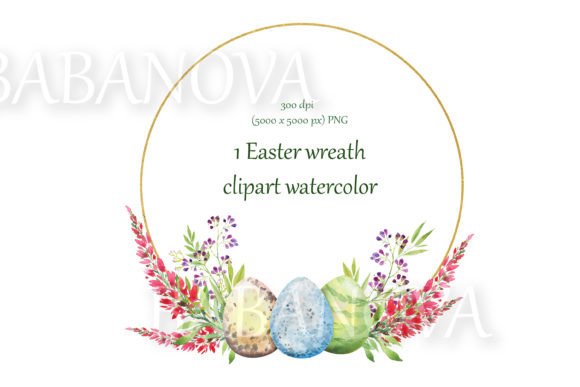
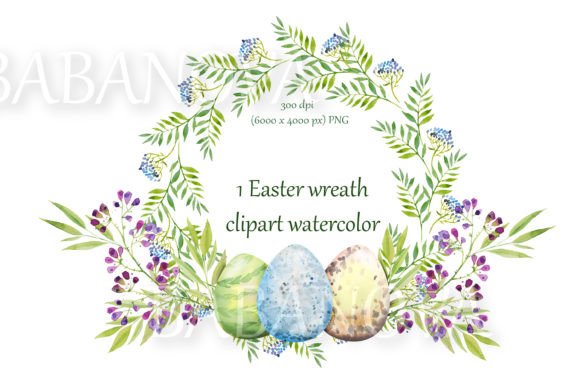
A watercolor Easter wreath overflowing with soft pink and violet blooms, delicately painted eggs, and fresh green foliage can instantly lift your spring projects. This specific Easter Floral Wreath with Flowers arrives as a high-resolution PNG with a transparent background, ready for everything from scrapbooking layouts to custom fabric designs. Yet many crafters and small business owners unknowingly compromise the quality of their final work simply because they overlook a few details unique to digital watercolor assets. Before you click “download,” let’s walk through the most frequent misjudgments and how to steer clear of them so your results truly reflect the charm of the hand-painted original.
Misunderstanding Resolution Doesn’t Mean Limitless Scaling
At first glance, a file sized around 6000 by 4000 pixels sounds enormous. You can already picture a stunning full-bleed wallpaper or a showstopping fabric panel. The catch is that pixel dimensions are only half the story—the other half is how those pixels translate into your chosen medium. This Easter floral wreath with berries and curly purple flowers was created at 300 dpi, giving you a crisp print at roughly 20 inches wide. If you try to stretch that same image to cover a 40-inch canvas without interpolation, the effective resolution drops to 150 dpi, which can leave edges looking soft and watercolor washes turning muddy. For printable quotes framed on a wall, this difference may not break the piece, but for heirloom-quality invitations or professionally printed fabric, the loss is noticeable. Before finalizing your design, calculate the exact print dimensions at 300 dpi. For unusually large surfaces, consider using the wreath as a decorative border or repeating element rather than forcing a single monster enlargement.
Ignoring the Transparent Background’s Creative Potential
Have you ever downloaded a clipart set, placed it over a colored background, and found an ugly white halo around the edges? That heart-sink moment happens when a file that looks transparent on the product page actually includes a white fill or flattened layer. The true gift of this Easter floral wreath with violet flowers and branches is its genuine transparent background. Yet many users treat it like a typical JPEG, accidentally adding a solid white backdrop before printing, which kills the airy watercolor feel. A better approach: always open the PNG in a program that respects alpha channels, like Affinity Designer, Procreate, or even a well-equipped word processor when layering. When you need a white backdrop for a print product, add it intentionally to a layer below the wreath, keeping the edges organic. This allows the pastel eggs, blue-purple petals, and delicate leaves to blend softly into the paper rather than sit behind a stiff rectangle. For digital invites posted on blogs or websites, placing this floral circle border against a subtle pastel gradient makes the composition feel luminous and intentional.
Expecting On-Screen Colors to Match Every Printer Perfectly
Watercolor illustrations possess a luminous, slightly unpredictable quality that makes them so beloved. That same quality can cause frustration when the soft blush of a peony turns glaringly neon on a home inkjet, or when the cool violet branches on your monitor print with a brownish cast. The issue isn’t the Easter Floral Wreath with Flowers itself but the gap between RGB displays and CMYK print processes. No one needs to become a color management expert overnight, but a tiny bit of foresight saves disappointment. Print a small test square at 100% scale on the exact paper or fabric you’ll use. If the vibrant pink and blue purple flowers feel too saturated, adjust the color curve slightly or talk with your print shop about their recommended settings. Many high-end printers accept RGB files and handle the conversion gracefully, especially when you specify a perceptual rendering intent. If the output matters for a client order or a wedding invitation, request a hard proof. Spending ten minutes on this step prevents reprinting costs and preserves the gentle, hand-painted personality of the watercolor illustration.
Overlooking the License Terms for Commercial Use
A beautiful bundle of hand-drawn flowers and eggs arrives in your downloads folder, and your entrepreneurial mind immediately pictures it on throw pillows, greeting cards, and packaging designs. Before you list those items, pause and confirm what the included license actually allows. Many digital clipart collections, even premium ones, are sold with a personal-use-only default. Others permit commercial use but prohibit reselling the unaltered image as a standalone item or using it on print-on-demand platforms in a way that directly competes with the original artist. The creators of this watercolor Easter wreath with curly pink flowers and foliage likely built those restrictions to protect their livelihood. A simple check of the download folder for a “ReadMe” or “License” text file clarifies everything. When in doubt, send a polite message to the shop. Much heartache comes from assuming rather than verifying—and a respectful inquiry often opens doors for custom licensing.
Forgetting That a Wreath Is Also a Design Kit
It’s tempting to plop the full oval of blossoms and eggs onto every surface and call it a day. The circular composition is gorgeous, but treating it as a single monolithic asset wastes a world of possibility. Look closer at those branches, berries, and individual violet blooms. By masking or cropping sections, you can create elegant half-wreath corner motifs for stationery, a soft cluster to anchor handwritten quotes, or even separate elements to sprinkle across a scrapbook spread. Because the background is transparent, isolating a small spray of leaves and pink blossoms takes seconds in most editing software. A common oversight: users shrink the entire wreath down to a tiny logo, losing all the delicate brush marks that make the illustration special. Instead, use the native high resolution to capture close-ups that maintain those painterly textures. This approach turns a single download into a versatile toolkit, letting your spring branding or home decor project feel cohesive without looking repetitive.
Storing the File Carelessly and Losing Quality
Digital files are easier to misplace than physical art supplies. You download the Easter floral wreath with eggs and green leaves, use it once, and then six months later you can’t remember where it lives—or worse, you discover it was accidentally saved as a low-quality compressed version when you tried to email it. Always keep the original high-resolution PNG in a dedicated folder with clear naming, something like Easter-Wreath-Original-300dpi.png. If you make a backup, avoid cloud services that auto-convert or compress images. Some social media platforms also downsample uploads aggressively, so never trust that the copy you downloaded from your own Facebook message is identical to the source. For long-term access, consider an external drive or a cloud archive that preserves pixel-level integrity. A little organization keeps the watercolor hand-painted charm intact for every future project, without forcing you to repurchase.
Choosing the Wrong Output Format After Editing
After you’ve crafted a lovely invitation or decorated a printable quote, your natural instinct might be to export as a JPEG. That single click strips away the transparency and flattens the subtle layers, often introducing artifacts around those tender petals. For anything that will be reused or sent to a professional printer, keep the final output as a PNG or a layered TIFF. When posting online, a high-quality PNG retains crispness while browsers display it beautifully. If you absolutely must supply a JPEG, say for a specific promotional requirement, first duplicate your master file and add the desired background color underneath the wreath, then flatten. That way the floral circle border still appears to float cleanly. This small habit separates professional-looking results from amateurish output.
Neglecting a Pre-Project Checklist
Before committing to that large-scale fabric print or the batch of 100 folded cards, run through a short mental list to avoid costly reprints:
- Resolution check: At the final print size, am I at or near 300 dpi?
- Color test: Have I seen a proof on the actual material, under normal lighting?
- Transparency verification: Does the background show through where expected, or is there a surprise fill?
- License confirmation: Is this use permitted, and if commercial, do I have documentation?
- File backup: Is the original PNG safely stored out of the active project folder?
Spending a few mindful minutes here means your watercolor Easter wreath design—with those delightful eggs, berries, and purple-blue curls—will always look as fresh as the moment the artist lifted the brush.
When you treat this Easter Floral Wreath with Flowers as more than a pretty picture—when you honor its resolution, protect its transparency, and experiment with its individual parts—you turn a single digital download into a lasting creative resource. The mistakes aren’t difficult to avoid; they’re simply easy to overlook in the rush of a project. With a little attention now, every invitation, piece of home decoration, or custom fabric print will carry the luminous, handcrafted spirit you were drawn to in the first place.