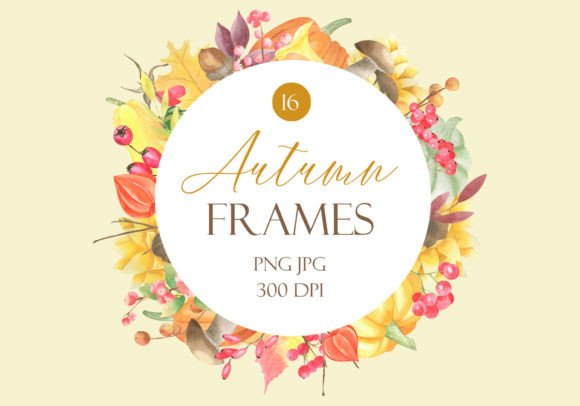
Avoiding Common Mistakes with Watercolor Autumn Floral Frames PNG JPG
Digital design assets can transform a simple project into something memorable, but only when you use them correctly. The collection of Watercolor Autumn Floral Frames PNG JPG offers 16 hand-painted frames filled with warm harvest tones—perfect for Thanksgiving invitations, greeting cards, scrapbooking layouts, product tags, and more. These files arrive in both PNG and JPG formats at 300 dpi, with generous dimensions like 4000x4000px and 6000x4000px, all compressed in a zip folder for easy downloading. Yet many creators, from small business owners to hobbyists, still run into frustrating issues that dull the final result or waste time. Below we’ll walk through the most frequent missteps, why they matter, and how to sidestep them so you can enjoy your creativity without regret.
Assuming All File Types Behave the Same Way
One of the first mistakes people make after downloading a bundle of Watercolor Autumn Floral Frames PNG JPG is treating the PNG and JPG versions interchangeably. Each format serves a distinct purpose, and picking the wrong one can lead to muddy edges, missing transparency, or bloated file sizes. A JPG has no transparent background—it flattens the frame onto a white or colored rectangle. This works fine for a quick print on white paper, but if you want to overlay the frame onto a textured background, a vintage paper, or a photograph, the white box will block everything behind it. A PNG, however, preserves the delicate transparency around watercolor leaves and berries, letting your background show through naturally.
Beyond transparency, pay attention to where you place the frame. Many users drag a PNG into a document and immediately send it to print without realizing the canvas size includes invisible margins. That “empty” space can push your design off-center. Always use the frame as a layer, and check the bounding box so the actual painted area aligns with your composition. If you only need the JPG because your background is white anyway, that’s fine—just consciously make that choice rather than grabbing whichever file opens first.
Overlooking Print Resolution and Scaling Limits
The term “300 dpi” appears prominently in the product description, yet it’s often misunderstood. Pixels per inch only have meaning when combined with physical dimensions. A 4000x4000px image at 300 dpi prints at about 13.3x13.3 inches without any loss of quality. When you try to stretch that same frame to fill a 24x36-inch poster, you’ll drop below 170 dpi, and the watercolor textures may look soft or pixelated. This collection provides frames in multiple sizes—some up to 6000px on the long side—so start by asking what your final output size will be.
A smarter approach: before placing the frame, set your canvas to the exact print dimensions and resolution you need. Place the frame as a smart object or high-resolution link rather than scaling it up repeatedly. If you’re designing for a small invitation card, you have more than enough resolution. If you’re creating a larger sign or fabric design, you might need to combine frames or use a single frame as a central motif rather than expecting it to span the entire area. Always run a test print on your home printer, even at a reduced scale, to see how the fine watercolor washes hold up.
Using Frames That Clash with Your Color Palette
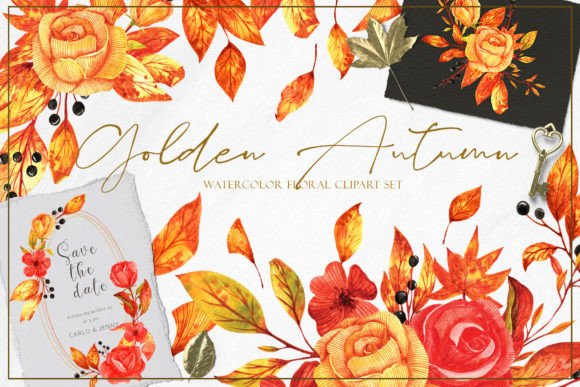
These autumn floral frames feature rich oranges, burgundies, golds, and muted greens—the quintessential harvest palette. A common source of dissatisfaction is dropping one of these frames onto a layout without adjusting the surrounding colors. If your background is a cool, icy blue, the warm tones can look jarring and disconnected. That doesn’t mean the frames are at fault; it means you need to harmonize your project. For Thanksgiving and harvest greetings, warm ivory, kraft paper brown, or deep plum backgrounds enhance the watercolor art beautifully.
You can also make subtle adjustments to the frame itself. Many graphics apps let you tweak hue, saturation, or apply a photo filter over the entire frame layer. If you need a slightly more muted look, reduce saturation by 15–20%. If your brand colors are more rust than bright orange, shift the reds and yellows slightly. Just be careful not to over-filter a high-quality watercolor asset; you bought the frame for its hand-painted charm, so preserve that brush texture and subtle color spills.
Neglecting Proper File Organization and Backup
After unzipping the downloaded folder, it’s tempting to leave all 16 frames in a generic “downloads” heap. Within a week, you can’t find the exact PNG you needed, or you accidentally delete a JPG thinking it’s a duplicate. The Watercolor Autumn Floral Frames PNG JPG set is a commercial resource—treat it like a valuable supply. Create a dedicated folder structure on your hard drive or cloud storage. Separate PNGs and JPGs into subfolders, and label each frame with a brief description if the filenames aren’t descriptive. This habit saves enormous frustration when you’re on a tight deadline for a client’s fall wedding invitation or a seasonal market flyer.
Also keep the original zip file stored somewhere safe. If you ever need to restore a fresh copy of a frame, you won’t have to dig through your purchase history. For those using these assets across multiple devices, a cloud folder synchronized to your desktop ensures you’re always working with the same version. Many users mistakenly edit the only copy of a file and cannot revert the changes later. Store an untouched master and work on duplicates.
Applying the Same Frame Across Every Project Without Variation
With 16 unique frames in one pack, you have a diverse range of shapes—circles, rectangles, ovals, and organic wreaths—yet some buyers fixate on one favorite and overuse it. Repetition dulls impact. If you send out a Thanksgiving card, a harvest market flyer, and a photo album cover all featuring the identical wreath, your audience will notice the recycled imagery. Instead, rotate between the different frames. Use a rectangular frame with corner florals for your scrapbook page, an oval wreath for a digital invitation header, and a circular frame for a product sticker. This builds a cohesive seasonal brand without looking like a template.
Layering also adds freshness. Combine two frames—perhaps place a smaller circular PNG frame inside a larger rectangular one—to create a custom border that nobody else will have. Because the PNG versions have transparent centers, you can nest them seamlessly. Experiment with opacity and blending modes to let the watercolor edges flow together naturally. The frames are starting points, not rigid containers.
Forgetting to Check Licensing for Commercial Projects
A quiet but serious mistake is assuming these digital assets come with unlimited commercial rights. While this set is marketed for craft projects, invitations, cards, and even unique shop tags, always verify the specific license agreement from the seller. Many designs are licensed for personal and small business use, meaning you can sell physical products like printed cards, but you may not resell the digital files themselves or use them as a standalone “printable” that competes with the original creator. Misusing the files can result in copyright flags on your online shop or, worse, a legal dispute.
If you plan to use the frames on fabric that you’ll sell by the yard, or as part of a digital planner template you distribute to thousands, read the license terms first. If the license is unclear, reach out to the seller. Good practice: keep a copy of the license file and note any attribution requirements. Most sellers appreciate a quick shoutout, but it’s not always mandatory. Protecting yourself on the front end prevents a lot of panic later.
Relying on Screen Brightness as a True Preview
A monitor’s backlight makes watercolor graphics glow vividly, but paper doesn’t emit light. When you print these autumn frames, the colors may look darker or flatter than you expected. Watercolor art especially relies on subtle transparency and overlapping washes, which screen pixels exaggerate. To avoid disappointment, always preview your design using a soft proofing setting if your software offers it, and consider the paper type. Uncoated paper absorbs more ink and softens fine details, while a glossy paper preserves sharpness but can shift color casts.
Print a small test swatch at actual size on the paper you’ll use for the final run. This simple step reveals whether you need to brighten the overall image, add a slight contrast boost, or switch to a brighter white stock. Many invitation designers learn this the hard way after printing 100 copies of a deep burgundy frame that appears almost black in candlelight. The PNG versions, because they contain transparency, also let you slip a white or cream layer behind the frame to preserve brightness if the background material is dark.
Ignoring the Pixel-Based Nature of the Files
These frames are raster images, not vector shapes. That means when you resize them drastically or edit them in ways that push the pixels too far, you introduce blurring and jagged edges. Some users try to convert a 4000x4000px PNG into a tiny icon without thinking about the loss of detail, or they enlarge a section of the frame beyond 100% and wonder why the brushstrokes look blocky. Stay within the resolution limits, and if you need a scalable vector version, you’d need a different type of illustration service—raster frames excel at richly textured, painterly looks that vectors cannot easily replicate.
A better workflow: determine the maximum area the frame will occupy in your design, check that it falls well within the original pixel dimensions at your target DPI, and only then proceed. This maintains the elegant watercolor paper texture and the fine lines of autumn leaves. For web use, you can safely downsize to 72 dpi and smaller dimensions, but always keep the high-res master for any future print needs.
Overcomplicating the Composition
Since these frames are already quite decorative, adding multiple competing elements can turn a pleasant design into visual chaos. A harvest greeting card with an elaborate watercolor wreath, three different script fonts, embossed foil stamps, and fall clip art scattered in the corners loses its message. Let the frame act as the hero element. Set your greeting in a clean, readable typeface inside or below the frame, and leave generous white space. The watercolor texture itself provides plenty of interest—let it breathe.
If you feel the need to add more, try subtle textures like linen or rice paper behind the entire layout rather than more graphics. This keeps the focus on the hand-painted quality of the autumn florals and avoids the amateur trap of “too much.” Remember that these frames were created to frame content, not to be buried under it.
By sidestepping these common pitfalls, you’ll get far more from your Watercolor Autumn Floral Frames PNG JPG collection. Whether you’re crafting Thanksgiving greetings, designing stationery for your shop, or assembling a heritage photo album, a little vigilance with resolution, color choices, and file types goes a long way. High-quality assets like these 16 frames can elevate your DIY projects into polished, professional-looking creations—just take the time to use them thoughtfully, test your prints, and keep that original zip folder close at hand.