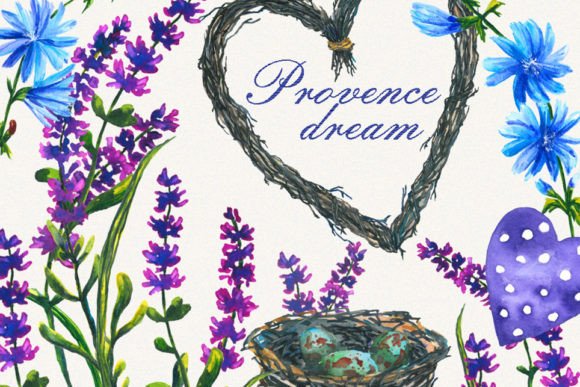
Lavender Clipart: High-Quality Hand-Painted Watercolor Florals for Seamless Creative Workflows
Digital assets like Lavender Clipart, Watercolor Floral collections are far more than decorative elements. They are functional components that bridge the gap between a raw idea and a polished physical product. When you acquire a set of high quality hand painted watercolor cliparts, you are not just buying images—you are integrating a resource that determines print clarity, design flexibility, and the speed at which you can move from concept to completion. Understanding how these files fit into your existing process, what they replace, and how they interact with other tools is essential for anyone working in stationery design, packaging, home decor, or small-batch production.
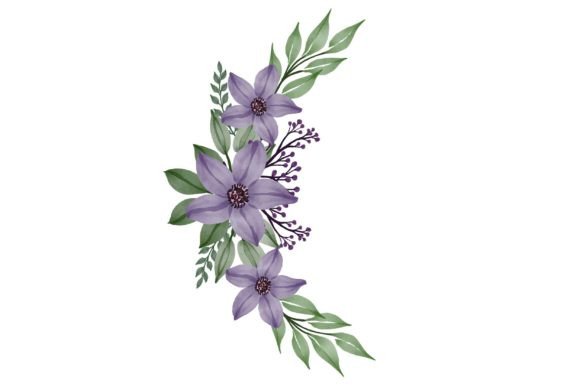
The pack described here includes two zip archives containing PNG files at 300 dpi in RGB color space with a transparent background. Element sizes range from tiny 0.7x0.8 cm accents to a 17x17 cm branch heart composition. This range is not arbitrary; it directly impacts how you plan a layout, avoid upscaling artifacts, and maintain consistency across different output formats. By focusing on the practical integration of these watercolor lavender elements, you can reduce rework, keep your asset library organized, and deliver results that match the original hand-painted aesthetic.
Understanding the Asset Foundation
Before using these cliparts in any project, you need to recognize what you are working with. Unlike vector illustrations, raster watercolor elements are born from physical brushstrokes scanned at high resolution. The 300 dpi setting is a deliberate choice for commercial printing. It ensures that when you place a flower on a wedding invitation or a product label, the delicate washes and granulation remain crisp without pixelation. The transparent background in PNG format eliminates the step of manual clipping paths. You drop the file into Adobe Photoshop, Illustrator, Affinity Designer, or even Canva, and the lavender branch sits naturally over any textured paper background, dark surface, or patterned layer.
The RGB color space might seem surprising for print-focused use, but it is the standard starting point for many hand-painted scans. In a professional workflow, you either convert to CMYK at the final export stage or let the printer’s RIP handle the conversion. If you are producing digital wall art or social media graphics, RGB remains your working space. Recognizing this allows you to set up documents correctly from the start, avoiding color shifts that can occur when you mix color profiles mid-process.
Integrating Watercolor Florals into Proven Creative Workflows
The real value of Lavender Clipart, Watercolor Floral emerges when you treat it as an integrated part of your design automation or semi-automated processes. For stationery designers, the typical workflow might begin with a template for a 5x7 invitation. Instead of searching for a new floral element every time, you pull from a well-organized kit. A heart-shaped composition measuring 17x17 cm can serve as a central frame for names and dates. Smaller individual sprigs become corner accents or envelope liner patterns. Because the elements share a consistent color palette and brush style—hallmarks of hand-painted originals—the final layout appears cohesive without hours of manual blending or color adjustment.
This principle extends to packaging designers and small business owners. When creating a product label for lavender soap or candles, you often need to test how the artwork interacts with a kraft paper texture, a white glossy background, or a dark glass surface. The transparent PNGs allow for rapid prototyping: you place the graphic, toggle the background layer, and assess readability and aesthetic balance. The range of sizes from tiny 0.28-inch blossoms to a 6.69-inch heart means you can build a complete visual hierarchy—hero element, secondary filler, and subtle background details—without resizing beyond the safe limits of the original resolution. Over-enlarging a small element can soften watercolor edges and lose the brushstroke texture, so starting with purpose-built large formats for banner elements and small formats for embellishments preserves the hand-painted fidelity.
Practical Applications Across Craft and Commerce
The versatility of these cliparts becomes clear when you examine the full list of supported outputs: decoupage or scrapbooking paper, post cards, wedding invitations, tags, wrapping paper, packaging, labels, business cards, home decor, clothes and accessories prints, wall-art, t-shirts, bags, pillowcases, towels—the list reflects a single resource serving both hobbyists and commercial creators. What ties these uses together is the need for a reliable, high-resolution base that adapts to absorbent and non-absorbent substrates alike.
For fabric printing, the watercolor elements can be arranged into repeat patterns for pillowcases or tote bags. The key is to design the repeat tile by isolating individual sprigs from the collection and placing them in a seamless block. Because you have both large focal elements and tiny fillers, the pattern can breathe; without the small accents, a floral repeat often feels static. The 300 dpi resolution at the intended print size means that even when a design is scaled for a 20-inch pillow, the watercolor washes retain their subtle gradients. This same logic applies to wall art: a gallery wall print using the branch heart as a centerpiece and smaller elements as floating accents avoids the common pitfall of a single oversized digital stamp being stretched beyond its native resolution.
In scrapbooking and card making, the integration is often more tactile. You might print the cliparts onto textured cardstock, cut them out, and layer them with foam dots. The quality of the print depends on how well your home printer interprets the RGB file. A useful implementation tip is to run a small test swatch on the exact paper you intend to use. Check for ink bleeding, which can muddy watercolor details. If needed, slightly reduce the print saturation in your document settings rather than editing the original PNG. Keep the master file untouched to preserve a clean source for future projects.
Technical Specifications That Streamline Production
The download format—2 zip archives of PNG files, 300 dpi, RGB, transparent background—is designed for immediate production deployment. The ZIP packaging allows you to share the exact asset set with a collaborator or transfer it between a desktop and a laptop without worrying about individual file corruption. When you extract the archives, adopting a consistent naming convention for the folders is an early organizational step that saves time later. A system based on element size or type (e.g., “Branches,” “Heart Compositions,” “Small Accents”) aligns with how you will actually search for assets during a layout sprint.
Transparent backgrounds in PNGs are often taken for granted, but they interact with layer blending modes in software like Illustrator or Procreate in ways that JPEGs cannot. You can place a lavender sprig over a gold foil texture and set the layer to Multiply to blend the watercolor naturally into the metallic sheen. Conversely, placing the same element over a dark navy background while preserving its light, airy pigment relies on the clean edge provided by the alpha channel. If you ever need to isolate a specific bloom from a branch, the high resolution gives you enough pixel data to use a soft-edge eraser without degrading the surrounding areas—an important consideration when repurposing elements for logo badges or brand marks.
Organizing and Archiving for Long-Term Use
An often-overlooked step in using high quality hand painted watercolor cliparts is the initial file management investment. You receive a sizable collection; immediately after downloading, create a master folder that sits in your primary design assets library. Inside, separate the original ZIP files so you always have an unmodified backup. Extract a working copy and structure subfolders by theme or dimension. Add a simple text file or a spreadsheet that maps the file names to a printed contact sheet showing the elements at a glance. This small effort eliminates the friction of opening multiple files just to recall which sprig is which. A contact sheet can be generated by placing the PNGs into a single document in Photoshop and printing it to PDF. The time spent here directly impacts your ability to mock up client concepts quickly, because you can visually select elements from the contact sheet without diving into folders.
From a business continuity perspective, this archiving practice also protects you. If you rely on a particular lavender composition for a signature product line—like a monthly tea towel or a recurring wedding suite—you can always return to the exact pristine file, even years later. The 300 dpi resolution remains print-ready for any foreseeable standard. And because the assets are hand-painted scans, they exist outside of software version dependencies; they will open in any application that reads PNG, ensuring your product line isn't held hostage by a proprietary format change.
Ensuring Quality and Consistency Across Projects
Consistency is a major concern when combining hand-painted elements from different sources. The beauty of a dedicated Lavender Clipart, Watercolor Floral kit is the internal coherence. All elements originate from the same brush, the same paint consistency, and the same scanning calibration. This eliminates the need for tedious Photoshop adjustments to match hue, saturation, and edge softness across two different clipart packs. When you design a product suite—a business card, a thank-you tag, and a wrapping paper sheet—you can confidently pull from different folders in the set and know the visual language remains unified.
Quality control extends to the print production phase. If you send a press-ready PDF to a commercial printer, embedded PNGs with transparent backgrounds can sometimes cause flattening issues if not handled correctly. A practical step is to rasterize the entire layout at the final size at 300 dpi before generating the PDF, or to communicate with your printer about how they handle live transparency. Most modern workflows handle it without complaint, but for high-quantity offset runs, flattening avoids surprises. Test prints on digital presses at small runs give you an early indication of how the watercolor grain translates to the chosen paper stock.
Expanding Creative Opportunities Through Strategic Combination
While the cliparts are strong standalone elements, they become even more powerful when combined with other resources. Pairing the lavender watercolor branches with a clean serif typeface and letterpress texture creates a wedding invitation that bridges rustic and elegant. For a home decor product, layering the heart composition over a photograph of a linen fabric texture, then printing on cotton canvas, produces a look that mimics original watercolor on textile. The key to these combinations is maintaining a clear source layer structure in your working file. Label your layers explicitly—“Lavender Heart 17cm,” “Texture Overlay,” “Type Lockup”—to allow for rapid client revisions.
These cliparts also have a place in digital product creation. Selling pre-made wedding social media templates or printable wall art sets becomes more efficient when you have a cohesive visual toolkit. You can build a entire shop collection around the single floral style, ensuring all products feel curated. Because you have the license to use the assets across multiple projects and commercial outputs, the initial investment scales across dozens of listings, pay-per-download products, or custom client work. This scalability is what separates a haphazard image purchase from a genuine production asset.
When learning a new software or technique, such as sublimation printing for mugs or polyester fabrics, starting with familiar, high-quality graphics removes one layer of troubleshooting. You know the image file is not the problem if the color transfer looks off; you can focus entirely on adjusting heat press temperature, pressure, and time. The RGB-to-print conversion journey becomes a learning path that you apply to future assets. In this way, a well-made watercolor clipart set serves as a reliable constant in a variable production environment.
Ultimately, integrating Lavender Clipart, Watercolor Floral into your workflow is about respecting the medium and preparing your environment to handle it with minimal friction. From the moment you download the zip archives to the final placement on a decoupage box or a wedding invitation, each decision—folder structure, document color settings, test prints, layer organization—compounds. The result is a faster turnaround, a more professional finish, and the freedom to focus on the message your design carries rather than the technical hoops required to get there.