Navy Blue Floral Bouquets: Streamlining Your Design Process with Ready-Made Botanical Graphics
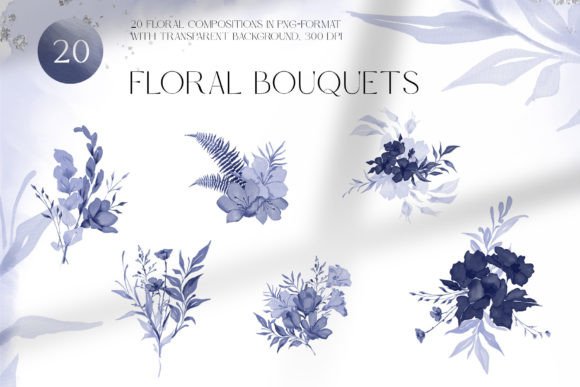
When you are balancing multiple creative projects or running a small product-based business, the difference between a smooth workflow and a frustrating one often comes down to the assets you use. Navy Blue Floral Bouquets represent a specific type of graphic resource: a curated set of 20 high-resolution floral compositions in PNG format with transparent backgrounds. They are designed to drop directly into dish decoration layouts, greeting cards, wedding invitation suites, fabric prints, wrapping paper, wallpapers, and bed linen patterns without requiring you to start from scratch. Understanding how to integrate these files into your existing process, rather than simply seeing them as decorative elements, helps you save hours of illustration time and keep project timelines predictable.
What Exactly Are Navy Blue Floral Bouquets?
At the most practical level, this is a digital download containing 20 pre-built floral arrangements. Each file is a 300dpi PNG with a transparent background, meaning the flowers, leaves, and stems are isolated from any backdrop. You are not receiving vectors, layered PSDs, or print-ready patterns; you are getting raster images with extremely clean edges and rich detail, all rendered in various shades of deep navy blue. The color consistency across the 20 compositions is a deliberate design choice that simplifies brand alignment. Because the heavy lifting of drawing, arranging, and balancing the botanical elements has already been done by the designer, you are purchasing a shortcut to a professional look. In a broader workflow, these assets sit between the concept phase and the final production phase—they turn a blank canvas into a nearly finished product within minutes.
Where Floral Graphics Fit into a Real Workflow
Before downloading any asset pack, it helps to locate it on your timeline. If you are creating a wedding invitation suite, the process might be: research, sketching, gathering resources, assembling the design, proofing, and printing. Navy Blue Floral Bouquets slip into the gathering and assembling stages. Instead of spending an afternoon hand-drawing floral corners, you can open the PNGs, position one as a focal element, adjust the scale, and begin layering typography. For fabric print designers, the integration point is slightly different: you typically build a seamless repeat pattern using digital elements. These bouquets can be isolated, rearranged, or used as medallions within a larger repeat tile. Recognizing that these are building blocks rather than entire finished products allows you to combine them with other assets—watercolor washes, vintage textures, or geometric backgrounds—without feeling constrained by the original compositions.
Preparing Your Environment for Smooth Integration
A few minutes of preparation prevents the frustration of pixelated edges or unexpected color shifts. Since the files arrive as 300dpi PNGs, they are already print-ready for most physical applications, but you need to confirm your document settings. If you are designing for a 12x12 inch scrapbook paper sheet, set your canvas to 3600x3600 pixels at 300dpi and import the floral graphic. It will maintain its clarity. If you are creating a digital greeting card intended for screen viewing only, you can work at a lower resolution, but downscaling a high-resolution image is always safer than enlarging a low-resolution one. Make sure your software’s color profile matches your output intent—Adobe RGB or sRGB for digital, CMYK for commercial offset printing. The navy blue tones may shift slightly during conversion, so a quick soft proof in Photoshop or Affinity Designer will confirm whether you need minor color adjustment layers on top of the PNGs.
Practical Implementation Across Different Project Types
The transparent backgrounds of these graphics make them immediately usable in layered designs, but different products call for specific placement strategies. Below are a few common use cases and how to approach each one.
Dish Decoration and Sublimation
For ceramic plate designs or mug printing, the floral composition often works best as a focal point centered on the dish or wrapping around the rim. Because you receive 20 variations, you can test multiple layouts in a template mockup before committing. Place the PNG into your mockup file, duplicate it, and rotate copies at 90-degree intervals to create a symmetrical border. If your sublimation printer requires a specific resolution, simply check the image size of the PNG against the physical print dimensions—300dpi at 10 inches wide means the file has 3000 pixels of width, which is enough for sharp output on most home decor blanks.
Wedding Invitation and Stationery Suites
Cohesion is key in invitation design. Pick one or two floral compositions from the pack and use them across the main invite, RSVP card, envelope liner, and thank-you note. By keeping the floral choice consistent, you create a suite that feels intentional. Place a bouquet in the top-left corner, then mirror it with a smaller element near the bottom right. Because the blues are already harmonized, you can focus on font pairings and layout without worrying about color mismatches. For printed pieces, export your final design at 300dpi as a PDF with crop marks. The original PNG’s resolution will hold up well even when the file is processed by a professional print shop.
Fabric Prints and Bed Linen Patterns
Surface pattern design requires repeatable elements. While these bouquets are not themselves seamless repeats, they can be used as standalone motifs on a solid ground, or you can break them apart by masking sections and recombining stems and blooms into a new composition. In a program like Procreate or Adobe Illustrator (with a linked PNG), start by placing one arrangement on a square tile. Overlap the edges on all four sides so that when the tile repeats, the bouquet connects seamlessly. Alternatively, scatter smaller individual flowers extracted from the larger compositions using simple selection tools—since the background is transparent, cutting out a single bloom is straightforward. For bed linen, scale the designs generously to maintain the high-end look; a 24-inch repeat requires the PNG to have enough pixel data, so verify your image size before scaling up dramatically.
Wrapping Paper and Wallpaper
These large-format items benefit from the rich navy color. For gift wrap, create a repeat pattern as described above and export at the full sheet size. For wallpaper, consider creating a half-drop or brick repeat pattern using multiple bouquets from the pack. Rotate them slightly, vary the scale, and overlap them with subtle texture layers to achieve a designer wallpaper appearance. The 20 compositions offer enough variety to build a complex, non-repetitive-looking surface even though you are reusing elements.
Organizing the Assets for Ongoing Efficiency
After you download the pack, don’t leave the files scattered in your downloads folder. Create a dedicated folder structure such as Resources > Floral Assets > Navy Blue Bouquets. Inside, rename the PNGs descriptively if the original filenames are not helpful—for instance, “floral_spray_left_01.png” or “centered_round_bouquet_02.png.” This may take a few minutes but directly reduces the time you spend hunting for the right composition later. If you use a digital asset manager like Eagle or Adobe Bridge, add tags like blue, 300dpi, transparent, and botanical. This way, when you start a new project, you can quickly pull up all blue floral assets across your entire library, not just this one pack.
Combining Navy Blue Floral Bouquets with Other Tools and Resources
These graphics rarely exist in isolation in a finished product. They pair exceptionally well with gold foil textures for a wedding suite, soft blush backgrounds for a feminine aesthetic, or crisp white space for a modern look. Use blending modes in Photoshop or Affinity Photo to give the flowers a subtle watercolor wash—place a pale paper texture layer above the bouquet and set the blending mode to Multiply. Because the PNGs are simple raster images, they accept layer effects easily: a drop shadow adds depth for a scrapbook page, a slight Gaussian blur on some elements creates a foreground–background illusion, and hue adjustments can shift the navy toward a teal or indigo if your brand palette needs a slight tweak. Just remember that hue changes work best when you apply them to the bouquet as a whole rather than trying to recolor individual petals, which can become time-consuming.
Quality Control Before Final Output
Before sending a design to print or uploading it for sale, do a checklist. First, zoom in to 100% and inspect the edges of the flowers for any stray pixelation if you have scaled the image beyond its original size. Second, if your project uses multiple bouquets, verify their relative resolutions—some may have been scaled slightly differently, causing inconsistency. Third, test a small proof print on the actual substrate if possible. Navy blue can appear darker on cotton fabric than on coated paper, so adjust brightness and contrast accordingly. For digital-only products, simulate different devices by previewing on a tablet and a smartphone to confirm the composition reads well at smaller sizes.
Long-Term Use and Scalability
The value of a pack like this grows as you reuse it across projects. A single bouquet might serve as a website mascot today, a product label element next month, and part of a social media template a year from now. Keep a master folder of your most successful layouts built with these graphics so you can replicate or adapt them quickly. If you sell physical products, photograph them in real settings and build a cohesive portfolio that subtly showcases the navy floral theme. Over time, this consistency can become recognizable, which supports branding without the need for custom illustrations every time.
When presented with a set of 20 compositions, some designers might worry about limitations, but the reality is that rotating, cropping, and combining elements generates far more than 20 distinct looks. Experiment with placing a bouquet partially off the canvas edge, using only its leaves, or mirroring it to form a symmetrical frame. The transparent background and high resolution invite this kind of playful reconstruction while keeping your workflow efficient.
By treating Navy Blue Floral Bouquets as a flexible structural component rather than a rigid clipart piece, you incorporate them naturally into planning, execution, and even the later stages of product photography and marketing. The designer has already addressed the technical requirements—resolution, isolation, and color harmony—so you can direct your attention toward composition, messaging, and the final user experience. Whether you are preparing a wedding invitation, a fabric line, or a set of decorative plates, having reliable, high-quality assets on hand removes a major bottleneck and gives you room to iterate without starting over.